
There are 10 AI tools that are completely free to use and you do not need to spend even a single rupee on them. It does not matter whether you are a content creator, a business owner, a student, or a job professional. This article has a tool for everyone that will make your life easier.
1. NoteGPT – All-in-One Learning Assistant
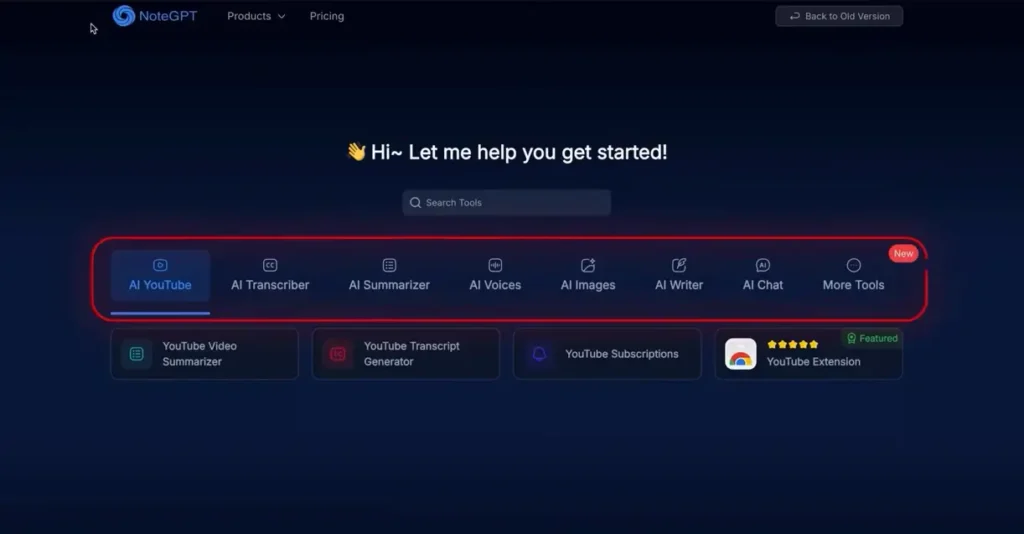
NoteGPT is an all-in-one learning assistant. If you are a creator or a student, this tool is going to be extremely useful for you.
Inside this tool, you get quite a few categories. The first one is YouTube AI, and the first tool inside it is the YouTube Video Summarizer.
If you paste any YouTube video link into this tool, you get a full detailed summary of that video. For example, by just reading the summary of a video, you can understand everything that happened in it, including details like why a company asked a creator to remove their content. Everything is presented in a clean table format.
If reading the summary feels like a lot, you can click once and convert the entire summary into a mind map. If you do this with educational videos, you will never need to make notes again. All the work gets done right there.
There is also an AI Chat option inside NoteGPT. You can use it to ask anything about the video and get instant answers.
And if you think that was already amazing, there is more. Right next to the YouTube AI section, you also get a YouTube Transcriber. Paste any video link and you get the full transcript with timestamps.
As a creator, you know how difficult it is to generate subtitles for YouTube videos. Here, it all happens in one click.
Related: Freelancing in 2026: Where Should Beginners Actually Start?
Next to the AI Transcriber is the AI Summarizer. You can upload anything and get a summary out of it. For example, if you upload an NCERT chapter, you do not need to read the entire chapter. You get a summary from which you can go and give a test or exam. A 13-page chapter becomes a single page with all the important details and information. Board exams are going on for many of you and this tool will be very helpful.
But the features of this AI tool do not end there. There is one more feature that will be very useful for creators. It is the AI Voices section, where you can literally convert any text into voice, clone your own voice, or design a new voice from scratch.
The text-to-voice feature gives you a limit of 100,000 words, which can generate around 100 minutes of voiceover. And the voices available here sound nothing like AI.
They are very natural. If you got this done somewhere else, you would be paying at least 2,000 rupees every month.
There is also an AI Writer inside NoteGPT that includes an AI Humanizer. You can use it to make AI-assisted content sound more natural and readable. The tool removes robotic words and adds a more conversational tone to the text.
NoteGPT is packed with a lot of features that are free to use. Personally, the AI Voice and AI Summarizer stood out the most because doing this work on other tools would empty your wallet. Here, that is not the case at all.
2. Meta AI – Free Image and Video Generator
After logging into Meta AI, you can use the Create feature to generate unlimited images and videos.
First, you select whether you want an image or a video. Then you choose the resolution of the image. After that, you write a prompt describing what kind of image you want.
You can even use ChatGPT to generate the prompt for you. You can also upload a reference image. Once you run the prompt, within a few seconds you have a result that is quite realistic for a free AI tool.
From there, you can change the style of the image. Within a few more seconds, you will have the same image in different styles. After that, click on Animate to convert your image into a video.
You get two options: Custom Animate and Normal Animate. With Custom Animate, you can write a prompt for the video you want. With Normal Animate, the subject simply performs some natural actions.
You can even add trending songs from social media into your animation. When the final result is ready, you can download it from there.
With Meta AI, you can create unlimited lip-sync videos to grow your Instagram page or generate AI avatars for YouTube videos. If you got this done on Heygen, you would be paying around 3,000 rupees every month. On Meta AI, everything is free.
Also Read: How to Start Freelancing in Pakistan and Earn Rs. 1 Lakh Per Month
3. Pomelli – AI Marketing Manager for Small Businesses
If you are a startup or a small business owner, this tool is going to be very useful.
Pomelli is an AI tool from Google apps. You can use it to create marketing campaigns for your brand.
Think of it as a marketing manager for your business.
You go to the site and paste your website link. The AI tool then analyzes your website and understands your business’s DNA, meaning your brand colors, motive, theme, style, and everything.
Once your website is analyzed, an interface opens up where your logo, colors, fonts, brand values, and every single detail is separated out. After that, the AI creates a social media campaign for your brand.
You just click on Looks Good and then you get the option to describe your campaign. If you already have an idea, great. If not, you can click on Suggest Idea and the tool will generate campaign ideas on its own. Once you select an idea, your social media creatives are ready. You can download and upload them directly. And if you do not like the creatives, you can edit them according to your requirements.
This tool is very helpful for small businesses because now you do not need to pay a social media manager. You can automate that work right here with Pomelli.
4. Opal – Build Apps Without Coding
If you are a software developer or just a regular person, this tool can change your life. With Opal, you can build vibe apps. It does not matter whether you learned coding in school or not.
You just go to this tool, write your idea for what kind of app you want, and the app gets built.
Here is a quick tutorial. Sign in to Opal and you will land on an interface. In the text area, write your app idea. For example, say you want an app that tells you your daily horoscope. You just need to explain the app a little. You can even use ChatGPT to generate the prompt and paste it in.
Once you do that, a workflow will appear showing how your app is going to work. In the IDE, you will also start seeing the app’s interface being built. You can manually change the workflow if you want, or click on the app to run it and see how it works.
For a horoscope app, it first asks for your information to determine your zodiac sign. You feed in your data and then it gives you your daily, weekly, and monthly horoscope. You also get the UI design showing what your app will look like. The homepage shows your sun sign, moon sign, lucky number, and all other information.
You can even make the app public, after which you get a shareable link that you can send to others.
And in the same way, you can build small apps and sell them to small businesses nearby and make a good profit.
5. MyLens AI – Visual Mind Maps for Everything
If you are a student or an aspiring entrepreneur, this tool will be very useful because you can create a visual mind map for literally anything.
Go to the MyLens AI site (mylens.ai) and you can either upload something or type any topic in the prompt area for which you want to create a mind map. You can also choose what type of mind map you want, as there are quite a few different styles available.
Once you run the prompt, your mind map is ready with every relevant point in a structured format. If you want to go deeper into any point, you can click on Expand to see the sub-points. If you want more detail on a point, click on Drill Down to get more information on that topic. And if you want a separate mind map for any sub-point, just click and select a style, and a separate mind map for that sub-point will be created.
If you click on Citation for any part, you will be able to see exactly where in your uploaded document that part appears.
Basically, if you are a lawyer, a financial advisor, or in any profession where you have to read thousands of pages of PDFs, this tool will make your life much easier. And for content creation, it will cut your research effort in half.
6. Arena AI – Compare Multiple AI Models for Free
If in 2026 you are still using different AI models separately and paying for each one, you do not need to do that anymore because you can do all of that completely free in Arena AI.
Arena AI is a tool where you can use different AI models side by side. Just choose the Battle Mode, then select which AI models you want to compare.
Literally all models are available here. For example, you can set up a competition between Claude 4.5 and ChatGPT 5.1. Just give a prompt in the input area, the same prompt you would normally give, and you get results from both models at the same time.
For instance, with a prompt about how to start YouTube from scratch, both models start out similarly but diverge as the response goes longer. Claude even gave a checklist at the end, which ChatGPT did not do. You can then choose which model to continue with, or keep using both models for the entire conversation.
You can experiment with not just text prompts but also code, images, and web search. For example, you can generate two images from a single prompt and compare the results. You do not need to spend a single rupee and you still get to use different AI models. A lot of your money is going to be saved in 2026 with this tool.
7. Napkin AI – Turn Text into Infographics Automatically
If you are a student, teacher, online consultant, or a startup founder, this tool is going to be very useful. Napkin AI takes your boring text presentation or information and represents it with eye-catching visuals automatically.
That means you do not need to sit on Canva for hours making infographics. Everything happens automatically.
Here is how to use it. When you sign in to the website, you get an interface where you can either paste your own text for which you want infographics, or write a normal idea and the AI will write the content and generate the infographics on its own. You can also import a PDF file.
For example, write a topic like “How to Grow on YouTube” and add some bullet points of what you want it to cover. When you run this, you get a full blog ready with research and data that you can present. And if you want an infographic for any paragraph, just click on Generate and within seconds, infographics for that paragraph are ready.
You even get to choose which infographic to use. You can change the color of the infographic and click on the text to change the font or font size. If you want any changes inside the infographic, you can do those manually as well.
You can also add extra data to your presentation and generate infographics related to that too. For example, if you paste data from Google and generate a chart from it, you get a chart based on that data. When you are done creating infographics for each paragraph, you can select the full infographic and download it.
Doing this on Canva or any other tool would take at least half an hour to an hour. On Napkin AI, it is a 2-minute job.
8. WhisprFlow – Best Voice to Text Tool on the Market
If you are a creator or in a job where you have to type prompts every few seconds and your fingers are worn out, WhisprFlow can help you.
WhisprFlow is basically a speech-to-text software that converts your voice into text.
Now you might think ChatGPT also has an audio prompt option, so what is different about this tool?
Here is the difference. Normal AI voice transcription tools capture whatever you say, exactly as you say it, including your stumbles, repetitions, and filler words. WhisprFlow understands that humans make mistakes when they speak. They stumble, they think, and they say things they did not mean to. So this AI tool is trained in a way that it ignores your mistakes and writes only the real thing you are trying to say in text form.
It also transcribes in English, so giving prompts becomes easy. This is currently the best speech-to-text tool on the market that will make your life a little easier.
You can use it for writing scripts, writing prompts, writing emails, literally anything.
9. Sonauto AI – Free Alternative to Suno AI for Music
You have probably seen creators on YouTube going viral by making AI music. The tool most people know for this is Suno AI, which is paid. And most probably you cannot afford it. But Sonauto AI is a free alternative.
Here you can generate songs and even use them commercially. There is no copyright issue.
To use this tool, sign in to their website, click on Make Music, and then switch to Advanced Mode. You have three options. You can let the AI write the lyrics, upload your own lyrics, or generate a song without any lyrics at all. By clicking on Advanced, you can see more settings.
You can select what style of music you want. For example, select a female voice and write melodic song as the style. When you click Generate, you get two results.
And that is how easy it is to create music today. You can further customize the song according to your preferences.
10. Google AI Studio (Real Time) – Your Personal Live AI Assistant
This is the tool that stood out the most in this entire article.
Google AI Studio has quite a few AI tools inside it, but the one worth highlighting is Real Time. With this tool, you can access AI in real time.
Go to the Google AI Studio website, and from the Playground category, you can access Real Time. You get three options: Talk, Webcam, and Share Screen.
The Share Screen option is particularly powerful. When you click on it, you get the option to share a specific window or your entire screen. Once you share your screen, whatever you are looking at on your screen, Google AI will also be able to see it.
If you then ask it a question and run a prompt, you get an instant answer. Real Time basically becomes your personal AI that can see everything happening in real time, understand it, and give you a solution accordingly.
Whether you are writing a script, working on office tasks, working on an Excel file, or doing your homework, this tool gives you instant AI assistance for your work. That is exactly why this tool was the favorite out of everything covered in this article.
Important Tips
- For NoteGPT, the AI Humanizer is great for making AI-assisted content sound more natural and conversational before publishing.
- For Meta AI, using a reference image along with your prompt gives much more accurate and realistic results.
- For Opal, using ChatGPT to generate your app prompt first and then pasting it into Opal gives better results.
- For Arena AI, try the same creative or coding prompt across two models to see which one actually gives a more useful output for your specific work.
- For Sonauto AI, if you do not have a music background, skip the advanced settings and just pick a style and voice to get started quickly.
Conclusion
These 10 free AI tools can genuinely save you a lot of money and time in 2026. Whether you need to summarize content, generate music, build apps, create infographics, compare AI models, or get real-time AI assistance on your screen, there is a free tool here for every use case. Start using them and you will wonder how you managed without them.
Disclaimer: We tested these tools based on their free features, ease of use, and usefulness for students, creators, and professionals. Since AI platforms change frequently, features and limits may vary over time.
Tool features and free limits may change over time. Always check the official website of each tool for the most up-to-date information on pricing and availability.