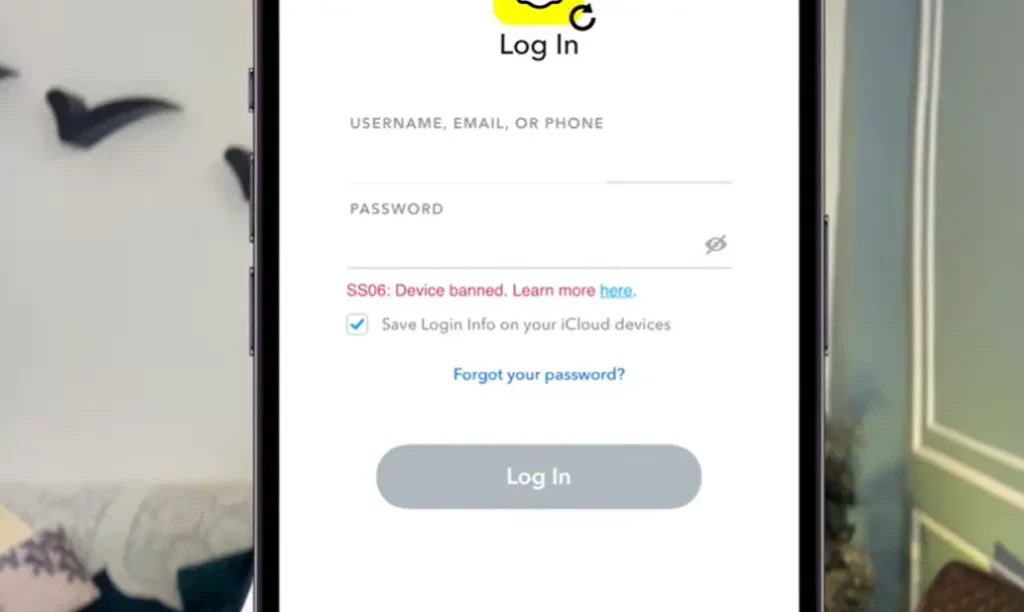
If you are a Snapchat user and you are getting the SS06 device banned error when trying to log in, you are not alone. This is a common problem that many users face, and there are multiple reasons why it happens.
In this article, we will cover all the possible reasons behind this error, how to fix it step by step, and one important thing that most creators never talk about, how to recover your data even if your account is gone.
What Is the Snapchat SS06 Device Ban Error?
When you try to log into Snapchat and see a message like:
- “SS06 – Device Banned”
- “Due to repeated attempts and suspicious activity, you are not accessible to your Snapchat”
- “Your Snapchat is temporarily disabled”
This means Snapchat has flagged your device and restricted your access. There is no single specific reason for this, there are multiple causes, which are explained below.

Reasons Behind the Snapchat SS06 Device Ban
1. Logging In on Too Many Devices
If you have multiple devices, like two iPhones, a MacBook, a PC, or multiple laptops, and you log into the same Snapchat account on all of them, Snapchat flags this as suspicious activity. Similarly, if you log into multiple Snapchat accounts on a single device, Snapchat treats this as spamming behavior.
When Snapchat issues a device ban, it is tied to your device’s IMEI number. Since IMEI numbers are unique and cannot be changed, a device ban means you will never be able to use Snapchat on that device again. The only solution in that case is to switch to a different device.
If you are running multiple accounts on a single smartphone, this problem will hit you sooner or later, there is no escaping it.
2. Using a VPN While Using Snapchat
This is one of the most common mistakes. Using a VPN while logged into Snapchat is a major trigger for account bans. Many users have reported that their Snapchat accounts got disabled after connecting to a VPN.
For example, if you are in India and you connect to a US VPN while using Snapchat, the IP bounce confuses Snapchat’s systems. In VPN-related cases, the account can sometimes be permanently locked and cannot be recovered.
The clear advice here is: never use Snapchat with a VPN connected. If you really need a VPN for other purposes, simply uninstall Snapchat before turning the VPN on.
3. Using Third-Party or Modded Applications
If you are using a third-party or modded version of Snapchat, or even if you just have other modded apps installed on your phone, Snapchat can detect this. Apps like bots and similar tools that were not downloaded from the official App Store or Play Store can trigger a device ban.
Even if you are not using a modded Snapchat directly, having such apps on your device can lead to your account being locked, permanently banned, or device banned. Always make sure your device only has apps from official stores.

How to Fix the Snapchat SS06 Device Ban Problem
If you are already facing this error, here are the steps to try and fix it:
Step 1: Wait 3 to 4 Days
The first thing to do is have some patience. Wait for 3 to 4 days without attempting to log in repeatedly. Sometimes Snapchat’s temporary restrictions lift on their own after a waiting period.
Step 2: Switch Your Network
If waiting does not help, try switching your network:
- Disconnect your device from Wi-Fi.
- Connect to your mobile data.
- Go into your device’s Network Settings and reset them.
- On iPhone, this is straightforward under Settings > General > Reset.
- On Android, the option may vary by device but is usually under Settings > General Management > Reset > Reset Network Settings.
- After resetting, try logging back into your Snapchat account.
This simple step resolves the issue for many users.
Step 3: Uninstall All Third-Party Applications
If switching networks did not work:
- Remove all apps from your device that were not downloaded from the official App Store or Google Play Store.
- Update Snapchat to the latest official version.
- Try logging in again.
This step is important if any unauthorized app was triggering the ban.
Step 4: Contact Snapchat Support
If none of the above steps work, you can try reaching out to Snapchat’s support team. However, there is an important truth you need to know about this, covered in the section below.
The Truth About Snapchat Device Bans That Nobody Tells You
Here is something very important that many YouTubers and online creators skip over. Snapchat has officially stated:
“If your device has been banned, Snapchat support cannot unban it for you.”
“However, in some cases, an in-app appeal option may appear when you try to log in. If you see an ‘Appeal Decision’ button, you can submit an appeal through the app. This is the only legitimate way to appeal a device ban.”
This means if a full device ban has been applied to your phone, even Snapchat’s own support team is unable to lift it. No form submission, no email, and no paid service from any third party will help. If anyone is promising to unban your device for money, they are misleading you.
The only real solution after a permanent device ban is to use a different device.
How to Recover Your Snapchat Data
Even if your Snapchat account cannot be saved, your data, photos, videos, and memories, can still be recovered. Here is how:
- Go to Snapchat’s official “Download Your Data” page (available on Snapchat’s website under account settings).
- You will see the option “Download Your Data and Memories”.
- Follow the steps carefully to download everything to your phone, laptop, PC, or hard drive.
Many users have already used this method to successfully save their memories even after losing account access. Your data does not have to be lost just because your account is banned.
Frequently Asked Questions (FAQs)
Q: What does the Snapchat SS06 device banned error mean?
It means Snapchat has banned your specific device, usually due to suspicious activity such as logging into too many accounts, using a VPN, or having third-party apps installed.
Q: How long does a Snapchat device ban last?
A device ban is permanent and tied to your device’s IMEI number. It does not expire on its own.
Q: Does using a VPN cause a Snapchat ban?
Yes. Using a VPN while using Snapchat is one of the most common causes of account disabling and device bans. In some VPN-related cases, the account is permanently locked and cannot be recovered.
Q: Can I recover my Snapchat memories after a device ban?
Yes. You can use Snapchat’s official “Download Your Data” feature to save your photos, videos, and memories to your device or computer, even if you can no longer access your account normally.
Q: What should I do first if I get this error?
Wait 3 to 4 days, then try resetting your network settings and reconnecting on mobile data. Also uninstall any third-party apps that were not downloaded from official app stores.
Q: Does using multiple Snapchat accounts on one phone cause a ban?
Yes. Running multiple Snapchat accounts on a single device is flagged as suspicious behavior and can lead to a device ban.
Conclusion
The Snapchat SS06 device banned error can be frustrating, but understanding the reasons behind it helps you avoid it in the future. The main causes are logging in on too many devices, using a VPN, and having third-party or modded apps on your phone. If you are already facing this issue, try switching your network and resetting network settings first. If nothing works, contact Snapchat support, but keep in mind that for a full device ban, even Snapchat cannot help.
Most importantly, never lose your data. Use Snapchat’s official data download feature to back up your memories. Following safe usage habits is the best way to protect your account from being flagged in the first place.