How to Apply NAVTTC Free Courses 2026
The Government of Pakistan and NAVTTC are offering free courses worth lakhs of rupees. Yes, you read that right. High-demand skills like AI, E-Commerce, and Digital Marketing are now available to learn completely free of cost. You do not have to spend even a single rupee.
Imagine learning these skills from home and then earning dollars by working with international clients. You will not get a better opportunity than this. Keep in mind that the last date to apply is June 5, 2026, and both men and women from all across Pakistan can apply for these courses.
If you have completed at least intermediate (12 years of education), you are eligible to apply. In this article, you will find all the details, links, and a complete step-by-step guide on how to apply.
What is the Skills for Tomorrow Freelancing Training Program?
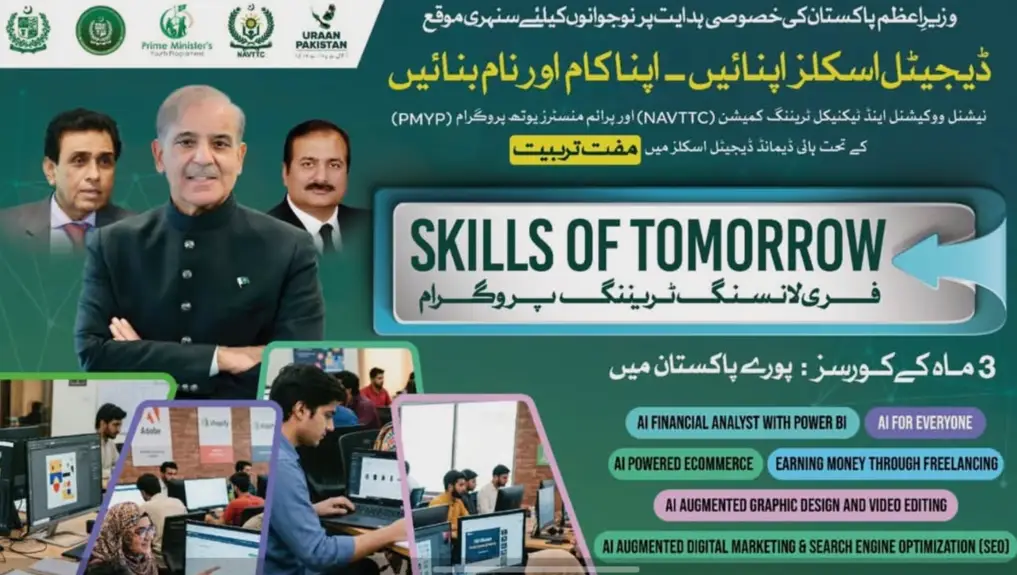
On the special instructions of the Prime Minister of Pakistan, this golden opportunity has been launched for the youth of the country. The message is simple: adopt digital skills, build your career, and make a name for yourself.
The name of this program is Skills for Tomorrow Freelancing Training Program. It is a three-month training course, and it is completely free. Both men and women from all over Pakistan can apply.
Also Read: PTF Teacher Electric Bike Scheme 2025: How to Apply, Eligibility, and Complete Guide
Available Courses
The following courses are being offered under this program:
- AI Financial Analytics with Power BI
- AI for Everyone
- AI-Powered E-Commerce
- Earning Money Through Freelancing
- AI Graphic Design and Video Editing
- AI Digital Marketing and Search Engine Optimization (SEO)
You will receive training under expert instructors from across the country. After completing the training, you will also receive a certificate, and paid internship opportunities will be provided.
Once you complete the course, you will be capable of freelancing and earning dollars from home by dealing with international clients.
Eligibility Criteria
- Minimum Education: Intermediate (12 years of education) for most courses.
- For AI Financial Analytics with Power BI: 14 years of education is required.
- For all other courses: Intermediate is enough.
- Gender: Both male and female candidates can apply from anywhere in Pakistan.
- Last Date to Apply: June 5, 2026.
How to Apply Online (Step-by-Step Guide)
Step 1: Open the NAVTTC Website
Open any browser on your phone or computer. You can use Google Chrome or any other browser. In the search bar, type “NSIS NAVTTC “ and search. The first website that appears in the results is the one you need to open. or VISIT THIS WEBSITE: nsis.navttc.gov.pk
Step 2: Create a New Account
If you are visiting this website for the first time and have never enrolled in any NAVTTC course before, you need to create a new account first.
Scroll down a little on the website. You will see options like Candidate, Institute, and Assessor. Click on “Candidate Barae Dakhla” (Candidate for Enrollment).
Now fill in the following details:
- Name: Enter your name exactly as it appears on your CNIC.
- CNIC Number: Enter your CNIC number.
- Email Address: Provide an active email address.
- Mobile Number: Enter your correct and active mobile number. This is important because you will receive calls and messages on this number, and you will be called to the institute through this number.
- Username: This will automatically be filled with your CNIC number. Leave it as it is.
- Password: Choose a strong password for your account.
After filling in all the details, click on the “Create Account” button.
Step 3: Log In to Your Account
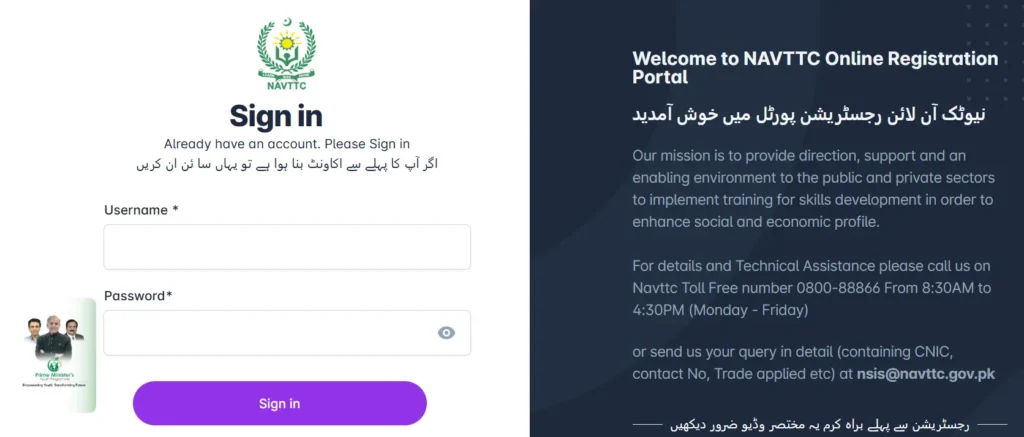
Once your account is created, log in using your CNIC number (without dashes) as the username and the password you just created. Then click on the “Sign In” button.
Already have an account? If you have applied for NAVTTC courses before but were not selected, your account already exists. Simply enter your old username (CNIC) and the password you set earlier, and sign in.
Forgot your password? Click on the “Forget Password” button. Scroll down a little, enter your CNIC number, and click on “Send Password.” A password reset link will be sent to your email. Reset your account, then sign in with your new credentials.
Step 4: Complete Your Profile (4 Steps Inside the Portal)
After signing in, you will see a dashboard interface. You need to complete your profile in four steps:
Step 4.1: Basic Information
Fill in the following details:
- Full Name
- Father’s Name
- Gender (Male or Female)
- Date of Birth (as mentioned on your CNIC)
- CNIC Number
- Active Mobile Number
- Email Address
- Passport Number (optional, skip if you don’t have one)
- District (select your district of residence)
- Domicile
- Complete Address
At the bottom, you will be asked if you belong to any of the following categories: widow, orphan, certified athlete, disabled, divorced, Hafiz-e-Quran, or eligible for Zakat. If any of these apply to you, select the relevant option.
After filling in everything, click the “Save Record” button.
Step 4.2: Upload Documents
Click on the “Documents” section and upload the following:
- Recent Photograph: Upload a fresh, recent photo of yourself.
- CNIC Picture: Upload a clear picture of your identity card.
If your photo is not uploading, the file size might be too large. Go to the Google Play Store and search for “Photo Compressor.” Download any photo compressor app, compress your photo to reduce its size, and then try uploading again.
Step 4.3: Add Your Qualifications
Click on the “Qualification” section and provide your educational details.
For Matric:
- Select Matric as the qualification.
- Choose your specialization (Science, Arts, Computer Science, etc.).
- Enter the institute name where you studied.
- Provide your percentage.
- If Matric is your highest qualification, select Yes. Otherwise, select No.
- If you have any technical skills, select Yes. Otherwise, select No.
- Upload a picture of your Matric certificate or degree.
- Click “Add Qualification.”
For Intermediate:
- Go back to the Qualification section.
- Select Intermediate.
- Choose your specialization (Pre-Engineering, Computer Science, etc.).
- Fill in the remaining details the same way.
- Upload your Intermediate degree picture.
- Click “Add Qualification.”
For Higher Education (if applicable):
If you have 14 years of education or more (Diploma, Bachelor’s, etc.), select the relevant option, provide specialization and all other details, and add it.
Step 4.4: Select Your Course
Now go to the “Trades” section. Here you will select which program you want to enroll in.
- Click on “Program” and scroll down to find “Skills for Tomorrow.” Select it.
- For Sector, select Information Technology (IT).
- Select your District. Almost all districts of Pakistan are available here. Search for your district and select it.
- In the Trade dropdown, select the course you want to do. For example: AI for Everyone, AI E-Commerce, Digital Marketing & SEO, Graphic Designing & Video Editing, etc.
- Select the Institute available in your district.
- Click on “Save Record.”
Step 5: Final Submission
After selecting your course, click on the “Continue” button. You will then see the “Final Submission” option. Click on it to submit your application.
You will notice that the form shows your gender (Male or Female) based on the information you provided earlier. Both male and female candidates from all across Pakistan can apply.
This is the complete application process.
Important Tips
- Make sure your mobile number is active and correct. You will receive calls and messages regarding your training on this number.
- Use a photo compressor app if your documents are not uploading due to large file size.
- Your CNIC number is your username. Do not forget your password. If you do, use the Forget Password option.
- Apply before the deadline of June 5, 2026. Do not wait until the last moment.
- For the AI Financial Analytics with Power BI course, you need at least 14 years of education. All other courses require only Intermediate.
FAQs
Q: Is this training program really free?
A: Yes, it is 100% free. You do not have to pay a single rupee. The Government of Pakistan and NAVTTC are fully funding this program.
Q: Who can apply for this program?
A: Both men and women from all across Pakistan can apply, provided they have at least an Intermediate (12 years of education) qualification.
Q: What is the duration of the training?
A: The training duration is three months.
Q: Will I get a certificate after completing the course?
A: Yes, you will receive a certificate upon completion. Paid internship opportunities will also be provided.
Q: What is the last date to apply?
A: The last date to apply is June 5, 2026.
Q: What is the minimum education requirement?
A: For most courses, Intermediate (12 years of education) is the minimum requirement. For the AI Financial Analytics with Power BI course, 14 years of education is required.
Q: Can I earn money after completing this course?
A: Yes. After completing the training, you will be capable of freelancing and earning dollars by working with international clients from home.
Q: My photo is not uploading on the website. What should I do?
A: Your photo file size might be too large. Download a photo compressor app from the Google Play Store, compress your photo, and then try uploading again.
Q: I applied before but was not selected. Can I apply again?
A: Yes. If you already have an account on the NAVTTC website, simply log in with your old credentials and apply for this new program. If you forgot your password, use the Forget Password option.
Q: What courses are available?
A: The available courses are AI Financial Analytics with Power BI, AI for Everyone, AI-Powered E-Commerce, Earning Money Through Freelancing, AI Graphic Design and Video Editing, and AI Digital Marketing and SEO.
Conclusion
This is a golden opportunity for the youth of Pakistan. The government is providing free training in some of the most in-demand digital skills, including AI, E-Commerce, Digital Marketing, and Freelancing. After completing the three-month course, you will receive a certificate and can start earning dollars by working with international clients from the comfort of your home.
Do not let this opportunity pass you by. Apply before June 5, 2026, and take the first step towards building a successful digital career.