
This guide is for every freelancer, whether you are just getting started or you have already been working online for some time.
In this article, we will cover which skills and niches are better on Fiverr, and what the difference between a skill and a niche actually is.
We will also look at which skills have the most demand in 2026, and which niche works best for each skill. Along with that, we will learn how to use the Fiverr search bar, how to select the right competitor, how to analyze a competitor’s gig, and finally how to understand and manage keywords in an Excel sheet.

Step 1: Skill Selection – Follow Your Natural Interest
The first and most important step in choosing a skill is to look at your natural tendency. Ask yourself: Am I a good content writer? Do I enjoy coding? Can I build websites? Am I interested in AI? Can I do video editing?
You need to first figure out which area genuinely interests you.
The definition of interest or natural tendency is this: you do not chase money in it. You should not be thinking about which field pays more.
Instead, ask yourself where your heart goes naturally. What do you enjoy learning even in your free time? What do you spend stolen moments studying whenever you get the chance?
That is your natural tendency. That is your true skill area.
The most important thing is to identify which skill your natural tendency points toward, and then focus on polishing that skill.
Now, if you do not know your natural tendency but still want to start earning online, the way to figure it out is to explore different skills. There are countless skills out there.
You can ask ChatGPT or search on YouTube. Try learning a little bit of each, and you will soon feel which one your attention keeps returning to. From there, you can define your skill.
Step 2: What Is the Difference Between a Skill and a Niche?
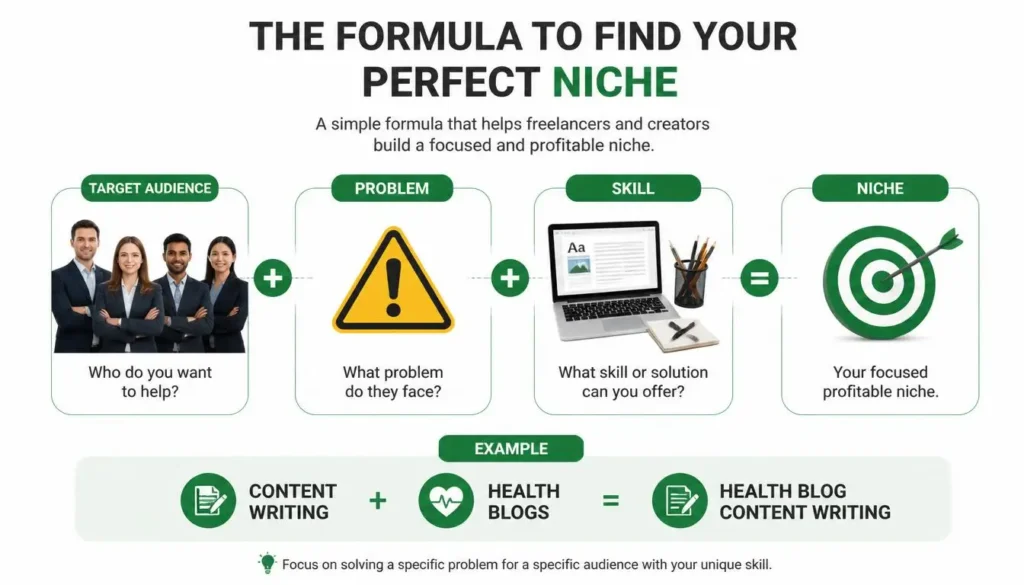
A skill is a talent or an ability. Content writing is a skill. Video editing is a skill. SEO is a skill. Logo design is a skill. All of these are skills.
Now, to identify a niche from your skill, you need to understand the problem of your target audience, the people you want to serve as buyers. You have to see how you can use your specific skill to solve their specific problem.
The formula is simple:
Target Audience + Problem + Skill = Niche
For example, if your skill is content writing, then “content writing for health blogs” becomes a niche. If your skill is logo design, then “logo design for real estate businesses” becomes a niche. If you do guest posting, then “guest posting for health blogs” or “guest posting for technology blogs” are both niches.
So a niche is not just a skill. It is a skill applied to a specific audience with a specific need.
Step 3: Top In-Demand Skills on Fiverr in 2026
Based on current market trends, here are the top priority skills with the highest demand right now in 2026.
AI Prompt Engineering is being used for business workflows, AI outputs, and ChatGPT-based automation.
AI Automation involves automating repetitive tasks and processes using AI tools.
Data Analytics is about analyzing and interpreting data to support business decisions.
Cybersecurity focuses on protecting systems, networks, and data from digital threats.
Video Editing is in high demand for YouTube Shorts, TikTok Reels, and similar platforms.
SEO (Search Engine Optimization) covers different levels including on-page SEO and off-page SEO, with advanced niche-based methods that make it very valuable.
No-Code Development is a growing field because with the help of AI, building websites and software no longer requires heavy coding. What used to take experienced developers a lot of time can now be done without writing extensive code at all.
UX/UI Design focuses on creating user-friendly interfaces and smooth experiences.
Content Strategy is also in demand, where AI is used to assist in writing and then that content is humanized. This is a strong and growing technique.
Specialized Virtual Assistants are being used across e-commerce, podcast management, admin support, CRM management, and more.
Every one of these skills can be paired with different niches, just as we have seen with the examples above.
Step 4: Beginner-Friendly Skills and Niches on Fiverr
If you are a new freelancer who has not done any technical course yet or is just beginning to learn, here is a list of skills and niches you can start with right away.
Virtual Assistant at a Basic Level includes data entry, email handling, and doing research for your clients on various topics.
Canva Graphic Design does not require any special course. With a little bit of effort, you can learn it quickly. It is used for social media posts, thumbnails, and simple design work.
Lead Generation means preparing a list of potential clients and finding their email addresses. This is a very good niche for beginners.
Social Media Assistant involves post scheduling, writing captions, adding hashtags, and managing client content on Twitter, Facebook, LinkedIn, and similar platforms.
Niche-Based Guest Posting is important to understand correctly. General guest posting no longer holds much value. What is valuable now is niche-based guest posting. For example, guest posting for technology blogs, guest posting for SaaS blogs, guest posting for health blogs, and so on.
Manual Backlink Outreach is also a skill that can be learned quite easily. You search for blogs relevant to your field, find their email addresses, send them an email, they share their posting price with you, you negotiate, and your deal is closed. That is a complete outreach cycle.
SEO Assistant – Note that this is SEO assistant, not SEO expert. This is an excellent starting point for someone new to the field.
Research Assistant is used for market research, competitor analysis, and keyword research.
Step 5: How to Select Your Competitor on Fiverr
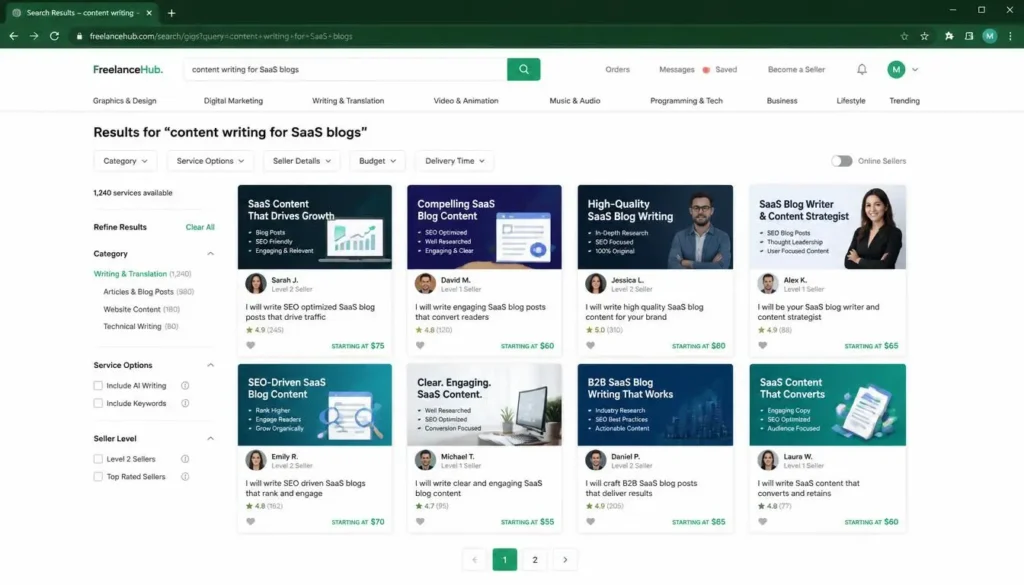
Once you have selected your skill and niche, the next step is choosing the right competitor to follow.
Remember: competition does not happen at the skill level. It happens at the niche level.
For example, if you search “content writing” on Fiverr, that is a very broad and diverse field. But if you search “content writing for SaaS blogs,” that becomes a specific niche with a much more focused audience.
To start, make sure you are in buyer mode on Fiverr. Then type your niche into the Fiverr search bar. For example, type “content writing” followed by “for SaaS blogs” and hit search.
You will see various gigs appear at different seller levels. Fiverr shows 48 gigs per page, and there are usually around 10 pages of results.
You need to stay focused on the first two pages only, page one and page two.
Within those results, you will see new sellers, Level 1 sellers, Level 2 sellers, top-rated sellers, vetted pros, and Fiverr Choice sellers. You should only select Level 1 and Level 2 sellers.
Do not select new sellers because their gig data is still in an imbalanced condition and does not give you reliable information to learn from. Also, do not select top-rated sellers. Your goal right now is to reach the next step on the ladder, not the tenth floor. Stay focused on what is just ahead of you.
From the first two pages, select at least 10 competitors in your niche at Level 1 or Level 2.
Step 6: How to Finalize Your Competitor List
Once you have a list of 10 to 20 potential competitors, do further filtering based on one key factor: how many reviews they have.
Look for competitors whose review count is at least 50 and goes up to around 300. Even better if they have some orders currently in their queue.
For example, a Level 1 seller with 26 reviews is one option, while a Level 2 seller with 83 reviews out of 927 completed orders is another strong example to study.
Open their gigs, copy the URL of each one, and paste it into your Excel sheet. These are your competitors.
The key rule to remember: your competitor is someone working in your same niche who is just a little bit ahead of where you are right now.
Step 7: How to Analyze a Competitor’s Gig
After finalizing 10 to 15 competitors, you need to analyze their gigs carefully. Here is what you must study in each one.
Gig Title: Look at which keywords they have used and how they have placed them within the title.
Profile Description: Read and understand how they have presented their background and services.
Gig Description: Pay close attention to the first two lines. Sellers place their most important keywords right there. Note down those keywords.
Price Packages: See how they have structured and priced their packages.
FAQs: Check which frequently asked questions they have focused on in their gig.
Feedback (Positive and Negative): Read the reviews they have received. This tells you exactly what clients care about and where gaps exist.
Go through the descriptions of 8 to 10 competitors. You will start to notice patterns and also gaps – things that competitors are missing or doing poorly.
Copying does not mean taking their content and pasting it into your own gig. That is not what this means. What it means is that you learn from them. After learning, you apply those lessons using your own keywords in a better and more thoughtful way inside your own gig description and price packages.
Step 8: Keyword Research Using the Fiverr Search Bar
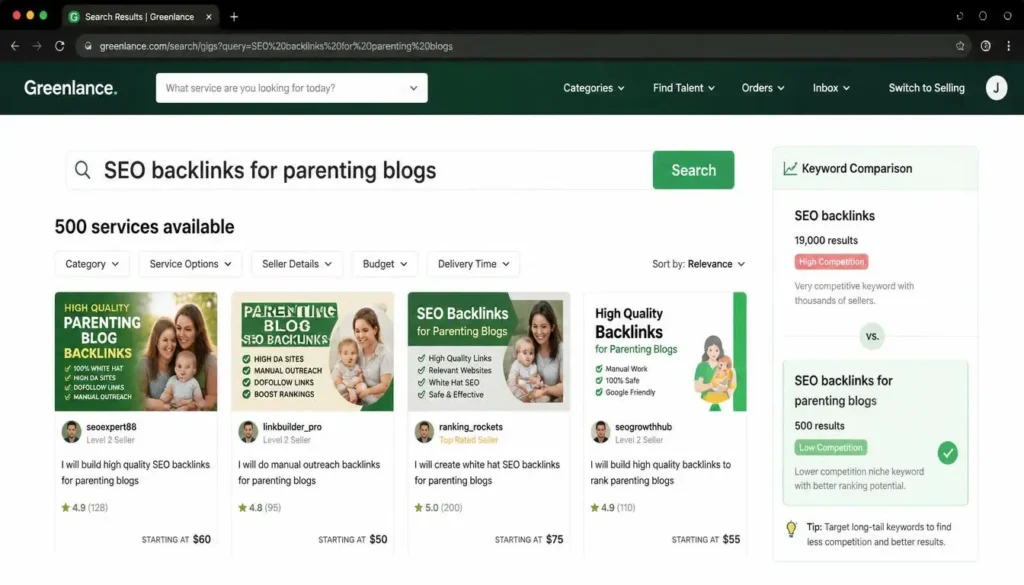
The Fiverr search bar is not just for finding gigs. It also shows you the search volume for specific niches, which is extremely useful when deciding which keyword to target.
For example, when you search “SEO backlinks” on Fiverr, you will see approximately 19,000 gigs competing for that keyword.
Now, when you convert that into a niche keyword by adding a specific audience, the results change completely. Search “SEO backlinks for parenting blogs” and you will get around 500 results. That is a gold mine. You are stepping out of a crowded market and into a specific, low-competition space.
You can and should try variations of the same niche to compare search volumes. For example, replace “parenting blogs” with “mom blogs” and you will likely see a similar range. Then try something like “parents guest post SEO backlinks” and you might see the volume jump to around 22,000. That one is too competitive, so you skip it.
The goal is to find the variation with a lower number that still shows real demand.
Step 9: How to Build Your Keyword Excel Sheet
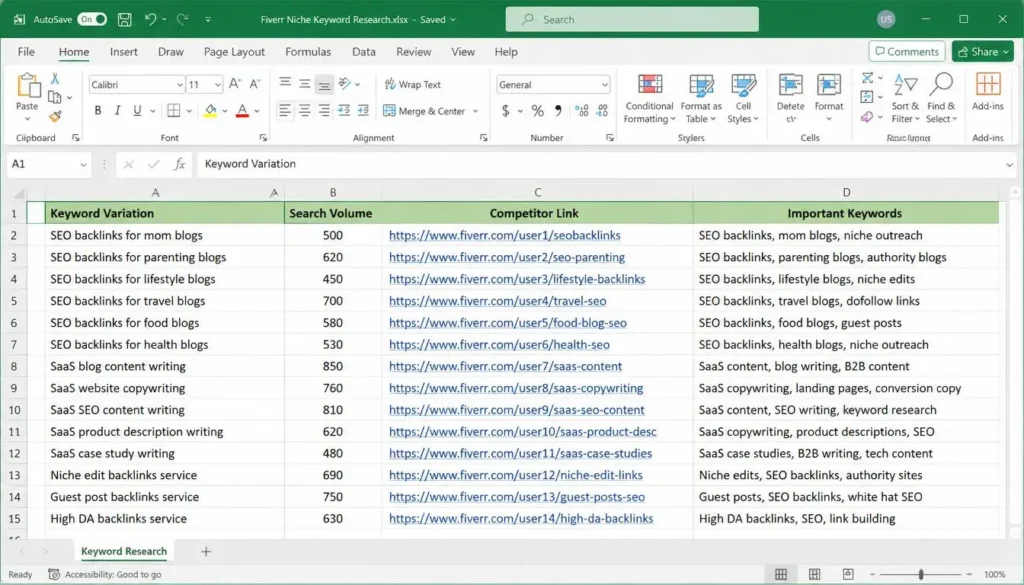
Create an Excel sheet with four columns to organize everything you have researched.
Column 1: Keyword Variation: Write the niche keyword you are testing. For example, “SEO backlinks for mom blogs.”
Column 2: Search Volume: Enter the number of results that keyword shows on Fiverr’s search bar. For example, 500.
Column 3: Competitor Link: Paste the URL of your competitor’s gig here so you can reference it later.
Column 4: Important Keywords: Note the important keywords you spotted in your competitor’s gig title and description.
As a general rule of thumb among experienced Fiverr sellers, the ideal search volume for your chosen keyword should be in the range of 400 to 1000 results on Fiverr. If your keyword lands in this range, your chances of ranking with your gig and getting orders increase significantly.
The complete process looks like this:
- Enter your niche keyword into the Fiverr search bar.
- Check the number of results it shows.
- Try different variations of that keyword.
- Record everything in your Excel sheet.
- Select the keyword with a search volume between 400 and 1000.
All of this preparation is for one purpose: to help you build the best possible Fiverr account and create an optimized gig that actually ranks.