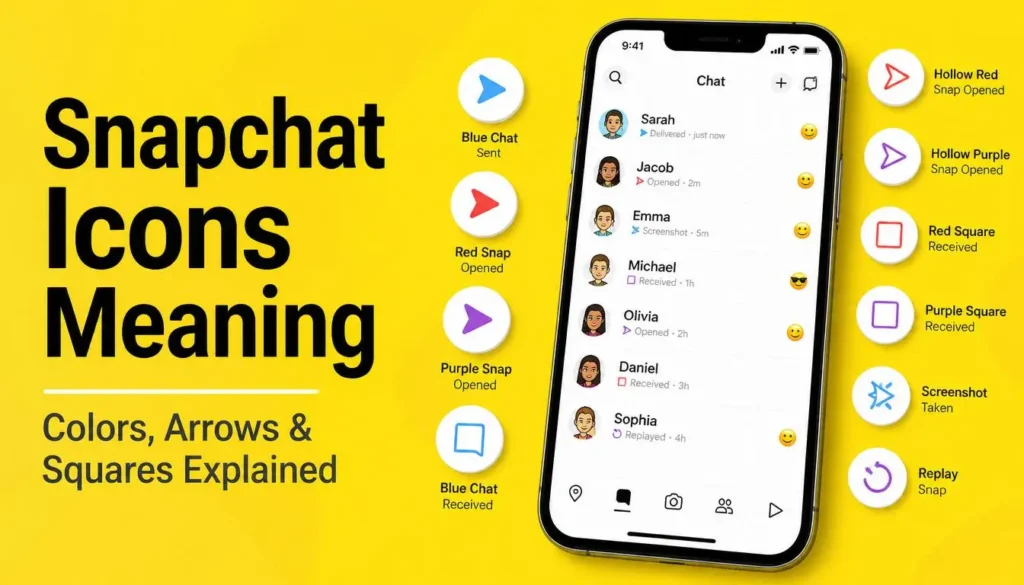
Snapchat uses colored icons to indicate different types of messages and their status. This guide explains what each color and shape means so you can read your conversations at a glance.
I will also explain what these mean, and when you open someone’s chat, sometimes a square icon appears and sometimes an arrow shaped icon appears. I will explain what all of these mean in this article.
Blue Icon: New Chat Received
Starting with the blue icon, which appears at the top of a conversation. This means we have received a new chat.
For example, a friend of mine sent me a new chat. When I opened it, I could see she had sent me “Hello”. I then replied “Hello” back to her.
So when this blue icon forms, it means we have received a new chat. And when it appears as a solid blue icon labeled “Delivered”, it means the chat we sent has reached the other person’s device, even though they have not opened it yet.
Red Icon: New Snap Received Without Audio
Moving to the next one, which is a red colored icon, this means we have received a new snap. This snap has no audio, meaning the sender has sent us a snap without any sound.
If you don’t hear any sound in it, meaning they haven’t said anything or played a song, this means the red color icon indicates they sent us a snap without audio.
Purple Icon: Snap Received With Audio
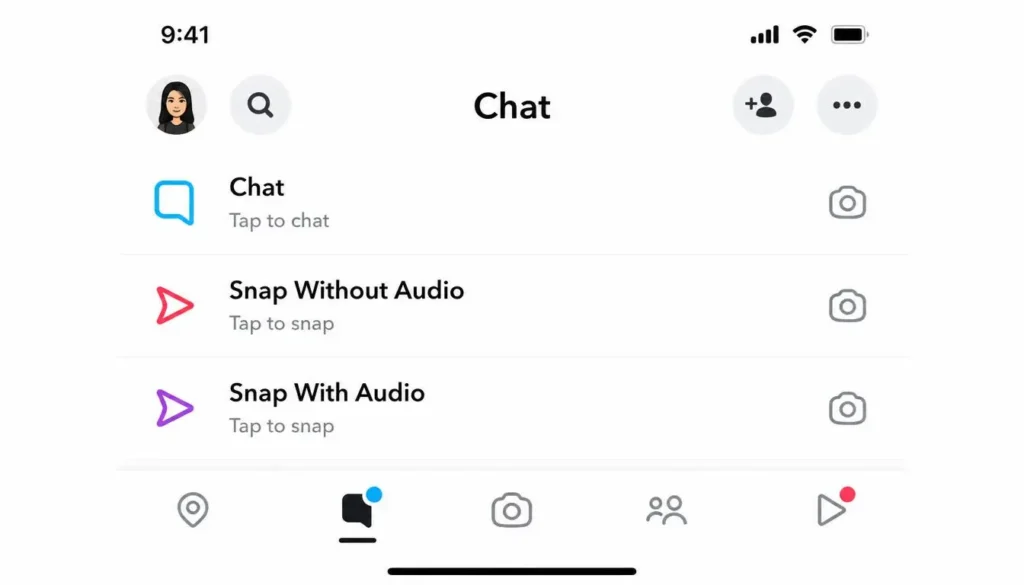
A purple icon means someone has sent a snap that contains audio, like they played a song or said something and you can hear a sound in it.
For example, a photo snap sent without any sound will show a red icon. A video snap recorded with audio – such as voice narration or background music – will show a purple icon instead. The color changes based purely on whether audio is present in the snap.
Now if I send a chat again, meaning I write any text and send it, a blue colored icon will appear.
In short, blue represents text chats, red represents snaps without audio, and purple represents snaps with audio.
Arrow Icons: When a Chat or Snap Has Been Opened
When the other person opens your chat or snap or opens our history, a small arrow shaped icon forms for the chat. This means the chat has been opened.
When they open the snap, this also shows as opened, but in purple color, meaning they opened the one with our song or audio in it. Once opened, the icon changes into an arrow that is empty, or hollow, from inside, meaning they have opened it.
Opening a Snap Someone Sent You
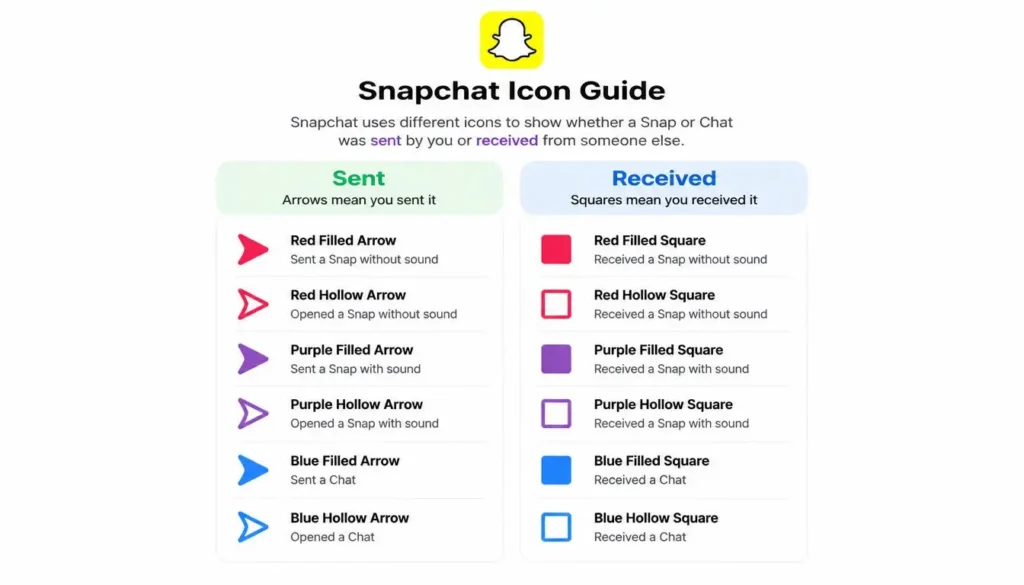
There is one more difference to know. For example, if a friend sends you a photo snap and you open it, the filled red square icon next to their name changes into a hollow red square, showing that you have already viewed it.
This is different from checking on a snap that you yourself sent to someone else. In that case, the same opened status is shown using a hollow arrow instead of a hollow square, since squares always represent items you have received, while arrows always represent items you have sent. This is how you can tell the two actions apart, along with the colors covered above.
Screenshot Notification
If you send someone a chat and they take a screenshot of it, what happens?
If someone takes a screenshot of your chat or snap, Snapchat immediately notifies you by displaying a screenshot icon inside the conversation. This icon looks like two overlapping arrows forming a box shape and appears directly below the message that was captured. Both parties can see this notification, so Snapchat’s screenshot alerts are visible to everyone in the chat.
Also Read: How to Buy Snapchat Plus Membership (Step-by-Step Guide)
Replay Notification

For example, I sent a snap to someone. If the recipient replays your snap, meaning they open it a second time after already viewing it once, a replay icon appears in the conversation.
This icon is displayed as a looping circular arrow and is separate from the standard opened icon. Snapchat only allows one replay per snap, so this notification appears only once per message.
Related: Snapchat Plus Features: 40+ Interesting Features Explained (Is It Worth It?)
Saved Snap Notification
There is one more feature worth knowing about. When you save a snap inside a chat, it does not disappear like a normal snap. Instead, it stays inside the conversation as saved Chat Media, so both you and the other person can scroll back and view it again later.
Also Read: Snapchat Add Friends Not Showing | How to Fix Snapchat Friends List Issue
FAQs
Why do arrows and squares appear next to Snapchat chats instead of just one shape?
The shape itself tells you the direction of the message, separate from what the color tells you. Arrow icons represent items you have sent, while square icons represent items you have received. Within each shape, a solid, filled icon means the item has not been opened yet, and a hollow, outlined version of the same icon means it has already been opened.
What does a gray icon mean on Snapchat?
A gray icon usually means your snap or chat is pending. This often happens if the other person has not accepted your friend request or if the message could not be delivered. The exact reason may vary depending on the account’s privacy settings.
How can you tell if someone has screenshotted your Snapchat chat or snap?
A distinct icon showing two overlapping arrows appears in the conversation whenever the other person takes a screenshot of your snap or chat.
Is the replay icon different from the regular opened icon?
Yes. A regular opened item shows as a hollow version of its icon, but a replay is shown separately with a looping, circular arrow symbol, since Snapchat only allows a snap to be replayed once after it has already been viewed.
Do sent snaps and received snaps use different icon shapes?
Yes. Sent items appear as arrow-shaped icons, while items you receive from someone else appear as square-shaped icons, and the red, purple, and blue coloring applies to both shapes depending on whether audio is involved.